















Manual Vs Automated Payroll: Which Is Better?
Manual Vs Automated Payroll: Which Process Fits Growing Businesses?
Payroll errors rarely begin with a single large, visible processing mistake. They often start with copied timesheets, late approvals, old spreadsheets, and missed rule updates. The manual vs. automated payroll decision matters because these gaps can quickly affect wages and deductions. Some also reach reports and payment files before teams notice the issue.
Payroll teams now need speed and evidence at the same time. PayrollOrg’s 2025 global payroll research identifies poor data inputs, late time-tracking data, and post-cut-off inputs as the top causes of reduced payroll accuracy. Manual payroll can support simple teams, although risk grows with scale. More entities and rules make every review cycle harder more quickly.
This guide helps leaders compare manual and automated payroll across risk, cost, scale, and control. It explains where manual work still fits and when payroll automation becomes necessary. It also outlines a phased approach that safely protects employees, payroll teams, reporting cycles, and business continuity at every transition stage.
Key Takeaways
- Manual payroll works best for simple teams with stable rules.
- Automation improves control when payroll scale and complexity increase steadily.
- Payroll errors often start with weak inputs and delayed approvals.
- Connected systems reduce the need for repeated entry across payroll and HR data.
- Exception visibility helps teams catch issues before the payroll approval stage.
- Audit evidence matters when employees or regulators question past payments.
- Migration should start with process mapping and employee data cleansing.
- Parallel payroll testing reduces risk before the new system launches.
- Ramco Payce supports controlled automation for complex global payroll operations.
What Is Manual Payroll?
Manual payroll means payroll teams calculate employee pay by hand. Teams may use spreadsheets, email approvals, calculators, and separate bank files. The process depends on payroll knowledge, process discipline and careful review before every payment cycle.
In practice, manual payroll usually includes these steps.
- Teams collect attendance, leave, salary changes and deductions from separate sources before calculation.
- Payroll operators calculate gross pay, statutory deductions and net pay using spreadsheets or local tools.
- Approvers review payroll summaries before salary release and statutory reporting.
- Finance teams prepare bank files and accounting entries after payroll approval.
- Payroll teams store evidence across folders, emails, reports and local files.
Manual payroll can feel flexible because teams can make late changes quickly. That flexibility becomes risky when more people, rules and approval steps enter the payroll cycle.
What is Automated Payroll?
Automated payroll uses configured rules and connects workflows to calculate, review, approve, and report payroll. It does not remove payroll teams from the process. It helps teams spend less time rebuilding calculations and more time reviewing exceptions.
A working automated payroll flow usually includes these steps.
- Approved HR, attendance and payroll inputs move into the system before calculation.
- The system applies configured rules for earnings, deductions, taxes and statutory contributions.
- Payroll teams review exceptions, approve results and retain evidence for future checks.
- Finance receives approved outputs for payments and accounting entries.
- Employees access payslips, tax records and personal details through self-service channels.
Payroll automation works best when the business keeps employee records clean. It also needs clear owners for approvals, corrections, exceptions and final release.
What is the Difference Between Manual and Automated Payroll?
Manual vs automated payroll differs by data movement, calculation control and error detection. Manual payroll depends on people repeating every step correctly, whereas Automated payroll uses configured rules, system integrations, and review controls to reduce repeated manual work.
| Area | Manual Payroll | Automated Payroll |
| Data Entry | Teams enter information into spreadsheets or local files | Approved data moves from connected systems |
| Calculations | Operators calculate wages and deductions manually | Configured rules calculate pay and deductions |
| Error Detection | Teams often find errors during review or after payment | Validation rules flag exceptions before approval |
| Compliance Updates | Payroll teams track rule changes manually | System updates support current statutory logic |
| Reporting | Reports often need manual consolidation | Dashboards draw from payroll data |
| Audit Evidence | Evidence may sit across emails and spreadsheets | Records show changes, approvals and calculations |
| Scale | Complexity rises sharply with headcount growth | Processing capacity supports larger pay runs |
When Does Manual Payroll Still Work for Businesses?
Manual payroll can still work for very small teams with simple pay rules and stable employee data. It suits businesses with one location, few allowance types, and limited overtime. It also needs a payroll owner who understands every step in the cycle.
Manual payroll works better when statutory rules remain stable, and payroll frequency stays predictable. The business should still document calculations, approvals, payment files and employee communication. Memory cannot replace evidence when employees, auditors or leaders ask questions later.
The turning point appears when the business adds entities, pay groups, foreign workers and employee self-service. Manual payroll also becomes harder when leaders need faster reports. At that stage, payroll accuracy depends on better controls, not longer working hours.
When Does Manual Payroll Create Risks for Enterprises?
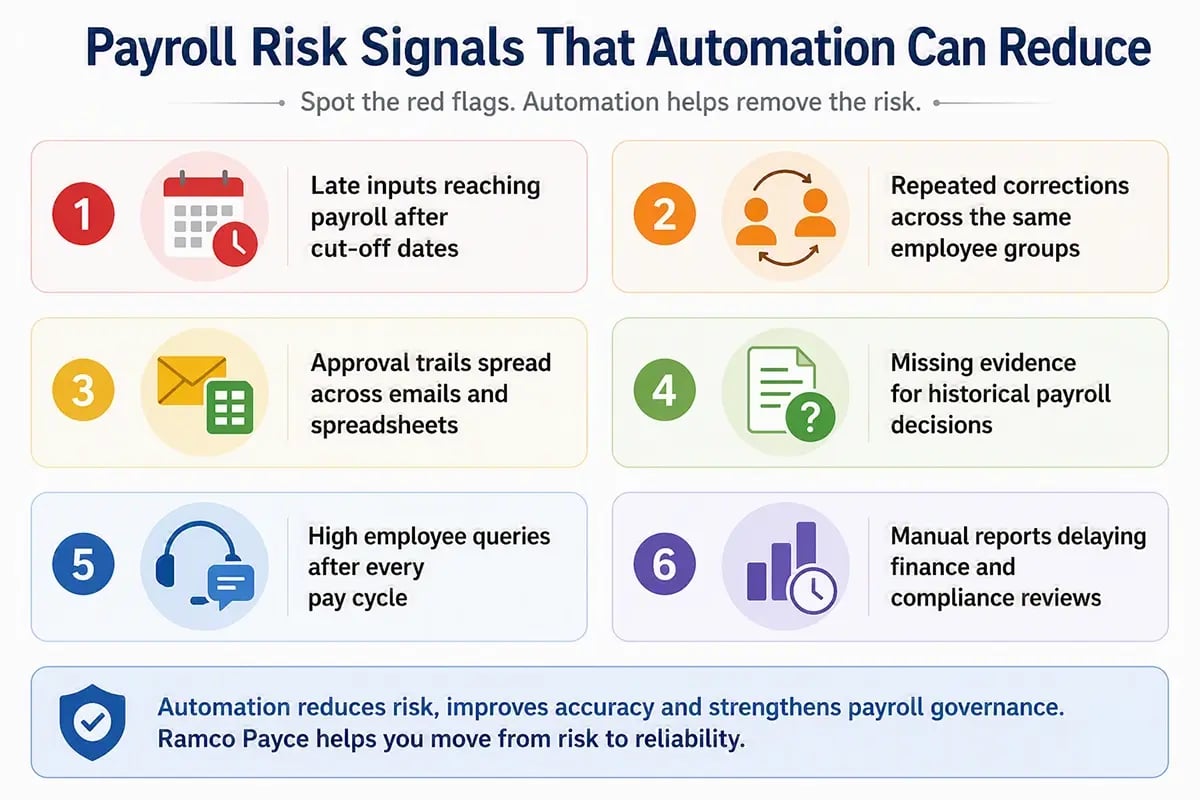
Manual payroll creates risk when repeated human effort becomes the main control across critical pay decisions. Small errors can move from timesheets into wages, deductions, reports and bank files. Payroll teams then spend more time correcting outcomes than strengthening the process.
- Input Errors: Manual payroll often depends on copied values from attendance sheets, emails, spreadsheets and local trackers. One incorrect figure can flow into gross pay, tax, leave balances, cost centres and payment files before reviewers notice during review.
- Rule Update Gaps: Payroll rules change through laws, policies, contracts, awards, and local practices across different worker groups. Manual teams need a controlled method to apply each change consistently before the next payroll cycle closes for affected employees.
- Approval Confusion: Manual approval trails often sit across email chains, shared folders, chat messages and disconnected documents. This makes it difficult to prove who reviewed changes, approved exceptions, and released each payroll file during later reviews or audits.
- Person Dependency: Manual payroll can rely on one experienced operator who understands every exception and workaround. That dependency creates continuity risk during leave, attrition, peak workloads, year-end reporting, and unexpected absences across critical cycles when deadlines tighten.
- Weak Audit Evidence: Manual processes can calculate pay correctly yet still leave evidence scattered across separate files and conversations. Regulators, auditors, finance leaders, and employees may need proof long after the payroll cycle has closed during disputes or reviews.
What Benefits Does Automated Payroll Provide to Organisations?
Automated payroll improves control by reducing repeated data entry and applying approved rules consistently. It gives payroll teams earlier visibility into exceptions and stronger supporting evidence. This helps teams move faster without weakening review discipline.
- Better Accuracy: Connected data and configured rules reduce calculation gaps across timesheets, allowances, deductions, tax settings and recurring salary changes.
- Faster Processing: Standard workflows move approved inputs through calculation, review, approval, and payment without having to rebuild the same work every cycle.
- Stronger Compliance Evidence: The system records payroll changes, approvals, submissions and reports in one place for audits, employee disputes and leadership reviews.
- Clearer Employee Experience: Employees can access payslips, tax records, leave balances and common payroll information without repeated HR follow-up.
- Better Exception Control: Payroll teams can focus on unusual changes, rejected records, missing inputs and material variances before payment files go out.
PayrollOrg’s 2025 research also found that 38% of respondents do not track payroll performance. That gap matters because teams cannot improve payroll accuracy, efficiency, compliance and employee experience without consistent measurement. Automated payroll gives leaders clearer visibility into exceptions, trends and unresolved issues across each cycle.
How Does Payroll Automation Advance Payroll Maturity?
Payroll automation advances payroll maturity by helping teams move from reactive correction to controlled processing. It gives leaders earlier visibility into inputs, exceptions, approvals and outcomes. This shift matters when payroll teams manage more entities, worker types, rules and reporting expectations.
- Data Maturity: Manual payroll often treats data cleanup as a final review activity. Payroll automation improves maturity by validating employee records, earning codes, bank details and exception fields before payroll calculations begin.
- Control Maturity: Manual payroll often depends on people remembering every approval and exception. Automated payroll creates clearer ownership by assigning tasks, recording decisions and showing unresolved actions before payroll close.
- Reporting Maturity: Manual payroll reports often arrive after decisions have already moved ahead. Payroll automation gives leaders earlier access to cost movements, variance patterns, exception trends and processing status.
- Employee Service Maturity: Manual payroll service often depends on inboxes and repeated follow-ups. Automated payroll supports employee self-service, guided query handling and clearer access to payslips, leave records and personal details.
This is why the decision between manual and automated payroll should not focus solely on software. It should show whether the business can advance payroll into a more controlled, measurable and scalable operating model.
What Costs Should Businesses Compare Before Automating Payroll?
Businesses should compare software cost with manual correction effort, payroll compliance exposure, employee query volume and continuity risk. A low-cost manual process can become expensive when teams spend hours fixing errors, reconciling records and rebuilding evidence.
| Cost Area | Manual Payroll Cost | Automated Payroll Cost |
| Time | Repeated data entry and manual checks | System setup and workflow review |
| Errors | Corrections, back payments and disputes | Configuration testing and exception handling |
| Compliance | Manual rule tracking and evidence gaps | Statutory updates and audit records |
| People | Dependence on specialist payroll knowledge | Training and change management |
| Scale | More work with every employee group | More value as volume increases |
Cost comparison should include risk and continuity, not just licence fees. Buyers should ask how much payroll effort goes into correction rather than controlled payroll processing. That review often reveals where automation creates value.
Once leaders understand the maturity gap, the next step is to plan the migration. Payroll Advance should not mean replacing every process at once. It should mean improving the payroll operating model through cleaner data, better controls, phased testing, and stronger adoption.
How Can Businesses Move from Manual to Automated Payroll?
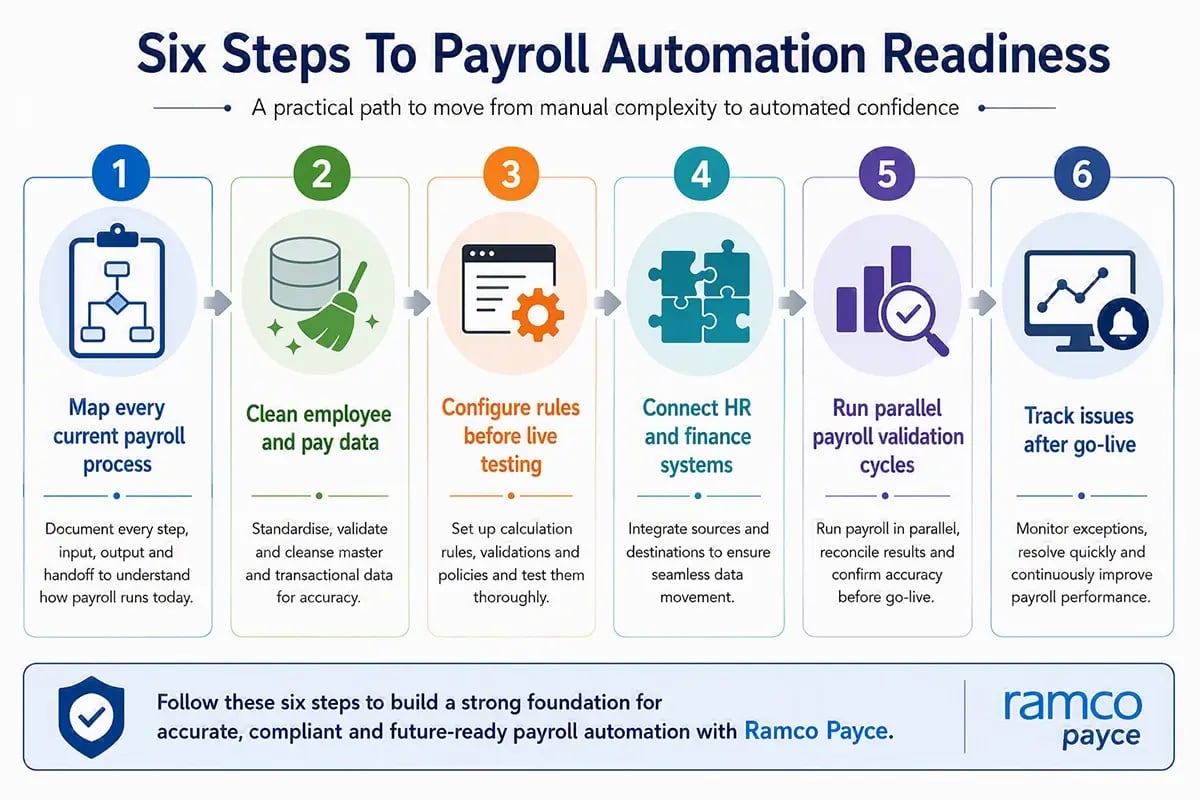
Businesses should move from manual to automated payroll through phased migration, not sudden replacement. Strong projects map current processes before configuring technology. Teams should test calculations, integrations, approvals, and reports before the new system becomes the payroll record.
- Step 1: Document Current Payroll: Map inputs, calculations, approvals, reports, bank files, and statutory tasks before choosing the automation design.
- Step 2: Clean Employee Data: Review employee records, earning codes, deductions, tax details, bank data, leave balances and reporting values.
- Step 3: Configure Payroll Rules: Translate current policies, statutory rules, contracts, and local practices into system logic before live testing.
- Step 4: Connect Source Systems: Integrate HR, attendance, finance, and banking systems, with clear rules for handling rejected or missing files.
- Step 5: Run Parallel Payroll: Compare manual and automated outputs across normal cycles, off-cycle runs, and deliberate error scenarios.
- Step 6: Go Live with Controls: Keep post-go-live checks, issue logs, user support and executive reporting active after cutover.
Migration also needs clear communication. Payroll teams should explain what employees will see, when payslips will change, and where to direct questions. This prevents avoidable confusion during the first live cycle.
What Should Global Employers Check Before Choosing Payroll Automation?
Global employers should check whether payroll automation supports both local compliance and centralised visibility. The system should handle country rules, currencies, employee groups, and integrations. Buyers should test real payroll scenarios before selecting a platform.
- Country Coverage: Global employers should confirm whether the platform supports current countries and future expansion markets. Payroll rules should reflect local statutory requirements and employee payment practices.
- Integration Readiness: The platform should connect with HR, time, finance, banking and reporting systems. Buyers should ask how rejected files and missing data get handled.
- Security Controls: Payroll contains bank details, tax records, identity data and salary information. Buyers should check access controls, encryption, audit logs and incident response.
- Processing Scale: Large employers need performance during peak cycles, year-end reporting and off-cycle payments. Test real volume before assuming the platform can scale.
- Employee Access: Employee self-service should support payslips, personal information, leave records and common payroll questions. This reduces support work after payroll release.
Global employers should also check governance depth. PayrollOrg’s 2025 report lists local compliance and the automation of inbound and outbound data as the top global payroll challenges. That finding supports a practical platform review in which buyers test data flows, compliance controls, and reporting outputs before choosing a global payroll automation platform.
How Should Leaders Decide Between Manual Payroll and Automated Payroll?
Leaders should decide between manual payroll and automated payroll by assessing process risk, scale, compliance pressure, and available expertise. The decision should not focus on headcount alone. It should reflect how many rules, changes and approvals the payroll team manages.
| Business Situation | Better Fit | Reason |
| Small team with simple pay rules | Manual payroll | Process volume and compliance complexity remain low |
| Growing team with repeated corrections |
Automated payroll |
Error patterns show the current process needs stronger controls |
| Multi-country or multi-entity payroll | Automated payroll | Central visibility and local rule support become essential |
| Sensitive payroll with strict evidence needs | Automated payroll | Audit trails and approvals need stronger structure |
Many businesses start with manual payroll and move to automation when control gaps become visible. Leaders should act before repeated errors affect employees, reporting confidence and payroll team capacity.
How Does Ramco Payce Support Automated Payroll?
At Ramco Payce, we support automated payroll for large, complex and multi-country organisations. We bring payroll processing, employee data, exception handling, analytics, and employee support into a single environment. This helps teams move from manual effort to controlled payroll operations.
Our Payroll Workspace gives payroll operators a single view of activities, anomalies, tasks, and reports. Our BInGO analytics layer helps finance and HR leaders build reports, analyse trends, and review exceptions without coding. Our Daily HR layer supports workflows for leave, expenses, payslips, and personal data.
Our Chia AI Assistant supports routine payroll and HR questions across conversational channels. Ramco Payce also processes 100 million payroll records in 30 minutes and supports payroll operations across more than 150 countries.
For global employers, Ramco Payce serves as global payroll software that bridges local compliance needs and enterprise visibility. That matters when manual vs automated payroll decisions move from one country to a wider operating model.
Book a 1:1 payroll automation consultation with our team to get started.
Final Take: What Should Leaders Do Next?
Manual vs automated payroll is not a choice between people and technology. It is a decision about how much payroll risk the business can manage through manual checks, individual knowledge and separate records.
Leaders should review current payroll errors, correction time, compliance gaps, employee queries and reporting delays. If those issues continue to increase, payroll automation becomes a practical control upgrade rather than a technology preference.
The next stage is payroll advancement through better data quality, stronger controls, clearer accountability and faster decision-making. Businesses must treat automation as part of a broader operating shift, not a standalone technology upgrade.
Explore Ramco Payce for automated global payroll.
Frequently Asked Questions (FAQs)
 What Is the Difference Between Manual and Automated Payroll for Enterprises?
Why Are Enterprises Moving From Manual Payroll to Automation?
When Should an Enterprise Automate Its Payroll Process?
What Are the Risks of Manual Payroll at Enterprise Scale?
How Does Automated Payroll Improve Enterprise Payroll Accuracy?
How Does Payroll Automation Strengthen Compliance and Audit Readiness?
What Are the Key Benefits of Automated Payroll for Large Organisations?
How Should Enterprises Compare the Cost of Manual Payroll vs Payroll Automation?
How Can Enterprises Successfully Migrate From Manual Payroll to Automated Payroll?
Can Automated Payroll Support Global Payroll Operations?
How Does AI Improve Enterprise Payroll Automation?
How Should Payroll Leaders Decide Between Manual and Automated Payroll?
You may also like!