
















What Is Payroll Software and How Does It Work?
What Is Payroll Software? Payroll Processing, Inputs, Outputs and Controls
Payroll software now controls far more than routine salary calculations across modern organisations. It connects employee records, business rules, approvals, statutory obligations, payment files and reporting workflows across each pay period. Deloitte reported in 2025 that automated payroll processing can reduce errors by up to 50% and processing time by 25%.
These gains depend on more than faster calculations during each payroll run. Payroll teams still need complete inputs, clear ownership, strong validation, and timely review before they approve employee payments. When inaccurate data enters the process, even an advanced engine can produce incorrect calculations.
For leaders asking what is payroll software, the answer requires an end-to-end view. This guide follows data from collection and validation through calculation, output creation, reconciliation, and error correction. It also shows where payroll leaders can strengthen control and where technology can remove avoidable manual effort.
Key Takeaways:
- Payroll software connects employee data, calculations, approvals, outputs and evidence.
- Complete inputs shape accurate payroll processing before calculations can begin.
- Validation checks catch missing fields, unusual values and approval gaps.
- Payroll outputs should trace back to a single approved source.
- Reconciliation confirms payment files, reports, journals and liabilities match approvals.
- Recurring errors often reveal weak ownership or upstream data problems.
- Payroll Workspace helps teams review activities, errors, anomalies and approvals.
- BInGO gives leaders payroll insight without manually assembling reports first.
- Chia helps employees access routine payroll information through conversational support.
What Is Payroll Software and Why Does It Matter?
Payroll software is a digital platform that collects approved employee data, applies pay rules, tracks approvals and calculates employee earnings. It also creates payment records, accounting entries, statutory reports and employee documents for each pay cycle. Modern automated payroll software adds validation, approvals, reporting, self-service access and audit evidence around those calculations.
- Employee Pay Calculation: The software converts salary, hours, overtime, allowances, deductions, taxes and employer contributions into accurate gross-to-net results. It uses approved data and applies configured rules consistently across employee groups.
- Workflow Management: The platform assigns tasks, tracks approvals, enforces payroll cut-offs and highlights unresolved actions before teams release each pay run. This visibility helps owners address delays earlier, before payroll reaches final approval.
- Compliance Support: Configured rules help teams calculate statutory liabilities and create records for reporting, payment, reconciliation and audit review. Payroll leaders still retain responsibility for governance and local accuracy.
- Employee and Business Outputs: One approved payroll result can produce payslips, bank files, statutory reports, accounting entries, control reports and employee documents.
Our payroll processing software integrates calculation, validation, distribution, and reporting into a single environment. This approach helps teams align operational control with every payroll result.
Once leaders understand what is payroll software, the next question becomes clearer: how does information move through payroll?
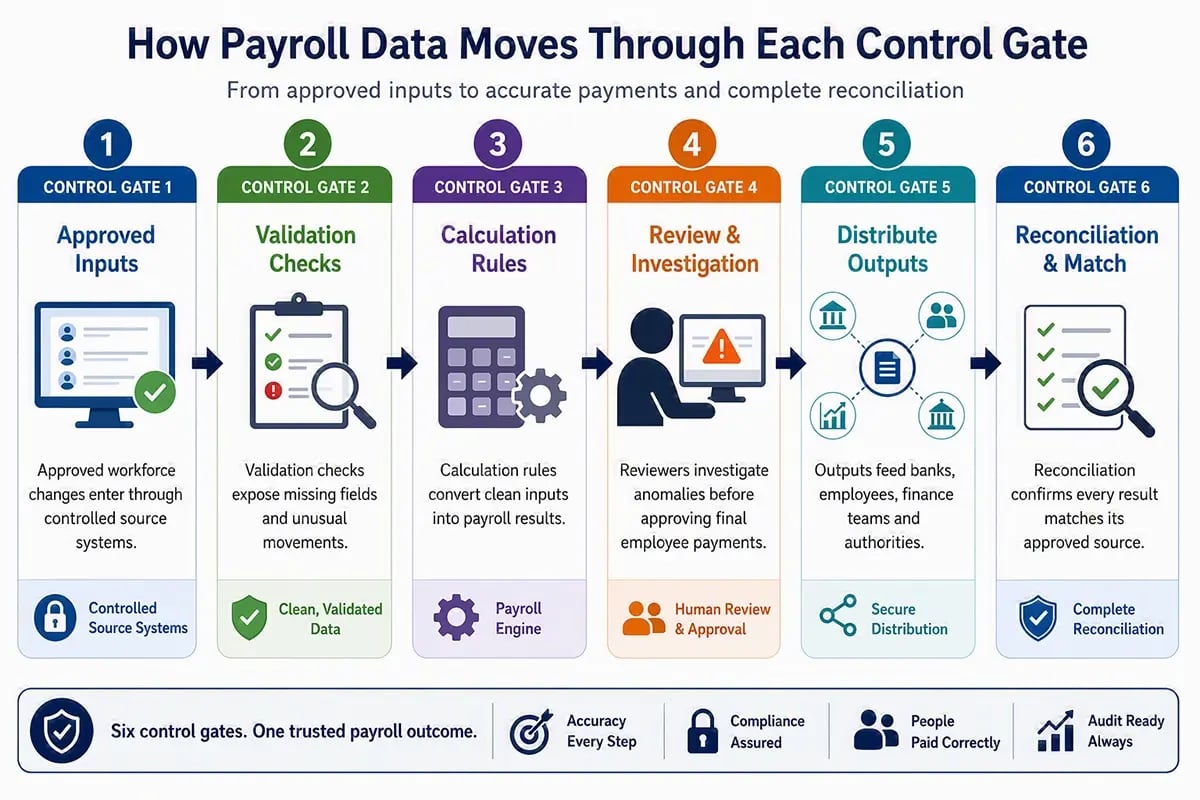
How Does a Payroll Run Move from Input to Final Payment?
To understand what is payroll software in practice, leaders should follow three interconnected stages before employees receive pay. Teams prepare inputs, calculate and review results, then complete payments and reporting. Each stage needs clear ownership, visible exceptions, timely approvals, and supporting evidence for every decision.
The payroll cycle becomes easier to control when teams understand where one stage ends and the next begins. That distinction helps teams place controls at the point of highest risk.
Pre-Payroll Preparation
Pre-payroll preparation brings every approved change into one place before the cut-off. Payroll teams collect employee updates, attendance, leave, variable earnings, deductions, benefits changes, and statutory instructions from responsible owners.
They then confirm completeness, resolve any missing files, document exceptions, and secure the required approvals before calculation begins. Through Payroll Workspace, we help teams view additional inputs, pending activities, errors, and ownership on a single operational screen.
Payroll Calculation and Review
During calculation, the payroll engine applies employee eligibility, earnings rules, deductions, taxes, contributions, retrospective changes, and rounding requirements. Trial runs convert those rules into employee-level results that payroll teams can examine.
Reviewers then compare variances, investigate anomalies, record decisions and approve material changes before final confirmation. BInGO adds real-time analysis and drill-down views, helping leaders examine unusual results without relying on manually assembled reports.
Post-Payroll Completion
After approval, the system creates bank files, payslips, statutory reports, accounting entries, management reports and employee documents. Payroll teams release payments and distribute records according to the agreed payroll calendar.
They also complete ledger posting, statutory submissions, reconciliation, employee communication and evidence retention. Our post-payroll guidance explains why these activities require the same control as the calculation itself.
This end-to-end view reveals one important dependency: every later stage relies on the quality of incoming payroll data.
Which Payroll Inputs Does Every Pay Cycle Need?
A complete answer to what payroll software is must include every approved data point that can affect pay, deductions, contributions, or reporting. These inputs may come from HR, time, finance, benefits or compliance teams. Each source needs a named owner, cut-off, format and transfer method.
- Employee Master Data: Confirm names, bank details, tax identifiers, work locations, employment status, pay groups, and compensation terms. Apply every change from the correct effective date for each employee.
- Time and Attendance: Import approved hours, shifts, overtime, absences, late arrivals, and unpaid time from connected systems or controlled manual templates.
- Variable Earnings: Capture bonuses, commissions, incentives, allowances, reimbursements, and one-time payments, with effective dates, supporting evidence, and manager approval.
- Deductions and Benefits: Record employee contributions, insurance deductions, loan recoveries, garnishments, and voluntary deductions under the correct eligibility and priority rules.
- Lifecycle Changes: Process joiners, leavers, promotions, transfers, salary changes, and retrospective adjustments before the agreed cut-off for the affected period.
- Statutory Information: Maintain tax declarations, contribution details, local reporting codes and jurisdiction-specific classifications through approved sources and effective-dated records.
Our payroll data guidance identifies HR, time, absence, benefits, mobility, travel and expense platforms as common inbound sources. Payroll Workspace can consolidate integrated and additional inputs, giving teams clearer visibility before processing begins. Collecting these payroll inputs starts the cycle, although validation determines whether teams can trust them.
How Can Payroll Teams Validate Inputs Before Processing?
Understanding what is payroll software also requires a clear view of payroll input validation. Teams must check whether data is complete, correctly formatted, authorised and reasonable before calculation. File checks, field rules, system reconciliation, and period comparisons can prevent incorrect values from reaching employee pay or reporting.
Excel and File Validation
File validation begins with the correct template version, required columns and accepted formats. Teams should identify duplicates, blank mandatory fields, invalid dates, and unexpected text inside numeric fields before uploading data.
They should also compare row counts, control totals, source ownership and submission timing. These checks show whether the file contains the expected population and whether an authorised owner supplied it.
Field-Level Validation
Field-level rules examine individual values against defined requirements. Common checks cover bank details, employee identifiers, pay codes, tax fields, effective dates and permissible ranges for hours or amounts.
Useful validation identifies the affected employee, the rejected field, the reason for the error, and the expected correction. A generic failure message slows resolution because payroll teams must search across the original file for the actual problem.
Cross-System and Period Validation
Cross-system validation compares payroll inputs with HR, time, benefits, and finance records. This step can reveal missing changes, duplicate updates, or values that differ from the approved source.
Period validation compares headcount, earnings, deductions, hours, and liabilities with earlier pay runs. Payroll Workspace can surface errors and anomalies during review, while our global payroll data guidance explains why many payroll problems begin upstream. Once teams trust the incoming data, a checklist can confirm that no required input remains outstanding.
What Should Teams Include in a Payroll Input Checklist?
A payroll input checklist confirms receipt, ownership, approval, format, completeness and cut-off compliance before calculation begins. It shows which inputs have arrived, which remain outstanding and who must resolve each exception. Teams should review the checklist carefully before every regular, off-cycle or adjustment payroll run.
| Checklist Area | What Payroll Teams Should Confirm |
| Employee Changes | Confirm approved joiners, leavers, transfers, salary changes, bank updates and employment status changes before the relevant payroll cut-off. |
| Time Records | Confirm attendance, leave, overtime, shifts, unpaid time and manager approvals for every employee included in the current pay period. |
| Variable Pay | Confirm bonuses, commissions, allowances, reimbursements and approved one-time payments with supporting records and correct effective dates. |
| Deductions And Benefits | Confirm new deductions, stopped deductions, contribution changes, recoveries and benefit enrolment updates before payroll calculation begins. |
| Statutory Data | Confirm that tax declarations, contribution records, local classifications, and required reporting codes remain complete, current, and properly authorised. |
| Submission Control | Confirm the file owners, template versions, cut-off dates, approvals, and escalation paths for each missing or rejected payroll input. |
A consistent input checklist gives teams a shared control point before calculations start. It also creates evidence that payroll followed the agreed process when questions arise later.
How Does Payroll Software Turn Approved Inputs into Net Pay?
The answer to what is payroll software becomes clearer when approved inputs enter calculation. The engine applies eligibility, pay rules, statutory logic, and period adjustments to produce gross pay. It then calculates deductions, taxes, employer liabilities, and the final net pay for each employee in the current cycle.
- Employee Eligibility: The engine first determines which earnings, benefits, deductions, and statutory rules apply to each employee. Effective dates, worker type, location and pay group shape that decision.
- Gross Pay Calculation: The system combines regular salary, approved hours, overtime, incentives, allowances, and retrospective changes. It then applies period rules, proration logic, rounding requirements, and any relevant caps.
- Deduction and Liability Calculation: Payroll software calculates employee deductions, employer contributions, taxes, and jurisdiction-specific liabilities. It also applies priorities when available pay cannot cover all deductions.
- Net Pay Confirmation: The engine applies rounding, limits, minimums, and final adjustments before confirming net pay. Reviewers can then compare employee results with prior periods and expected changes.
Our Payce platform supports these payroll processing steps via an in-memory engine capable of processing 100 million payroll records in 30 minutes. Payroll Workspace adds visibility into activities, errors, anomalies, and approvals before final release. These capabilities matter when high-volume teams need speed without losing control.
Once the calculation is approved, the system must convert each result into usable payroll records and files.
Which Payroll Outputs Should Every System Create?
A full explanation of what is payroll software must cover the payroll outputs created after calculation and approval. These records serve employees, finance teams, authorities, and business leaders. Each output should trace back to the same approved payroll result across all downstream processes to ensure accurate reconciliation.
- Employee Payslips: Payslips show earnings, deductions, contributions, leave information, and net payment for each period. Through Daily HR, we give employees direct access to current and historical payroll records.
- Bank Payment Files: Approved net pay moves into secure bank files or payment instructions. Teams should confirm employee accounts, payment dates, file formats and control totals before transmission.
- Statutory Reports: Payroll outputs support tax, social contribution, wage reporting and jurisdiction-specific submissions. Local requirements determine each report’s structure, timing, submission method and supporting records.
- Accounting Files: Payroll results create general ledger postings, cost allocations, liability entries and control summaries. These files help finance teams connect workforce costs with approved payroll results.
- Control Reports: Payroll teams use registers, exception reports, variance summaries and approval evidence to review each run. With BInGO, we help leaders analyse payroll data through real-time reports and drill-down views.
- Employee Documents: The system may create tax statements, year-end records, termination documents and other country-specific forms. Our Chia assistant can help employees find routine payroll information without raising repeated support requests.
Creating outputs completes the calculation, although payroll teams must still validate them before release.
How Do Payroll Teams Validate Outputs Before Release?
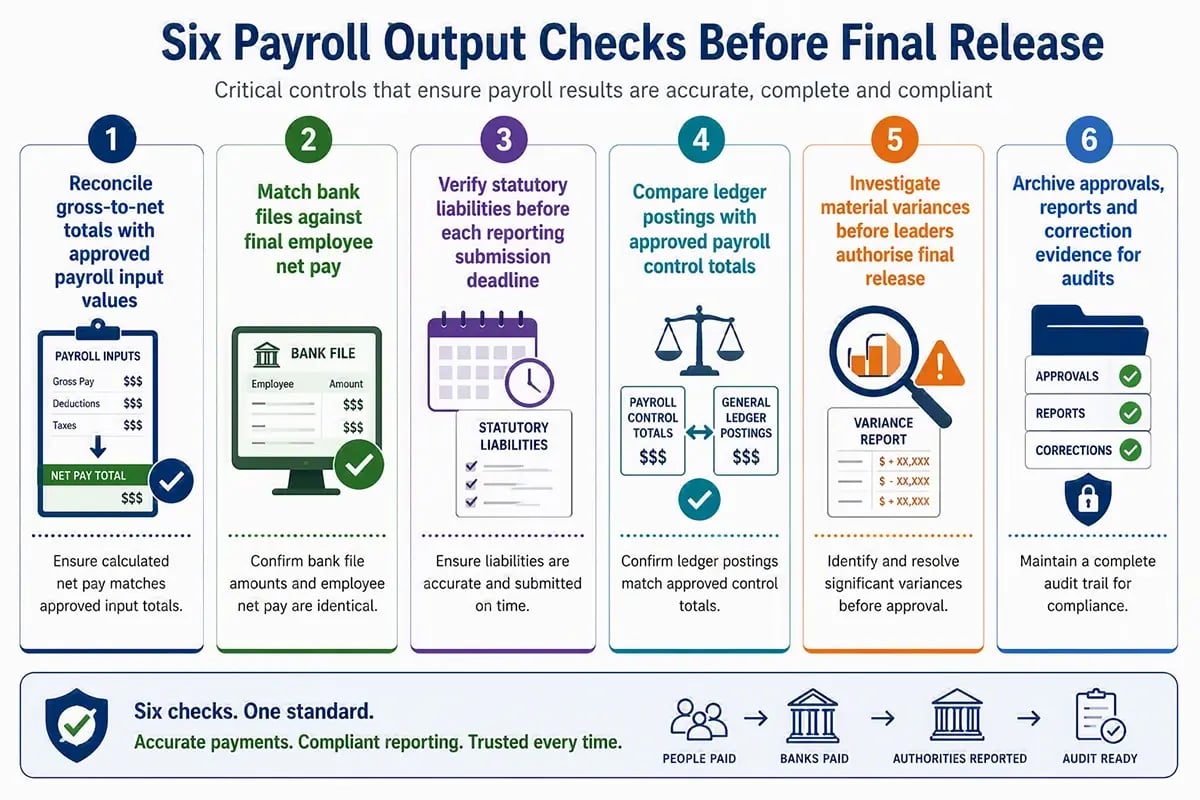
Payroll output validation confirms that calculated results match approved inputs, payment totals, accounting records, and statutory liabilities. Teams should complete these checks before releasing funds, issuing payslips, or submitting reports. A clear sign-off process prevents unresolved differences from moving into finance or employee records across each cycle.
Payroll Register Reconciliation
Payroll teams should compare employee count, gross earnings, deductions, employer liabilities, and net pay with approved totals. They should investigate unexpected movements against prior periods and known workforce changes. Our payroll audit guidance recommends reviewing input changes and output differences through defined controls.
Net Pay and Bank File Matching
The bank file total must exactly match the approved net pay before transmission. Reviewers should confirm included employees, account details, payment dates, and rejected records. They should then retain evidence that the final file matches the approved payroll register.
Statutory Liability Validation
Teams should compare tax, social contribution, and reporting liabilities with payroll registers and expected filing totals. This check can uncover incorrect classifications, mapping errors or year-to-date differences. Payroll teams should resolve each difference before submitting statutory records or related payments.
General Ledger and Variance Review
Finance should confirm that payroll journals reconcile with control totals and use the correct accounts, entities and cost centres. Payroll and finance teams should explain material variances before posting. BInGO can support this review through real-time analysis and drill-down reporting.
Which Payroll Errors Occur Most Often and How Can Teams Fix Them?
Common payroll errors include missing inputs, incorrect employee data, calculation differences, duplicate payments, failed files, and statutory reporting mismatches. Teams should correct the immediate issue, identify its source, record the root cause, and add a preventive control.
| Payroll Error | Likely Cause | How Teams Should Fix and Prevent It |
| Missing Or Late Input | A missed cut-off, unclear ownership, or failed integration delays required payroll data. | Correct the missing record, rerun affected calculations, and assign a named owner for every future submission. |
| Incorrect Pay Rate | Outdated master data or an unapproved salary change creates the wrong employee rate. | Correct the effective-dated record, calculate arrears or recovery, and strengthen approval checks for future changes. |
| Time And Leave Mismatch | Time, leave and payroll systems hold different approved hours or absence information. | Reconcile source systems, correct approved records and monitor failed transfers before the next payroll cut-off. |
| Incorrect Deduction | Wrong eligibility, amount, priority, or effective date can unexpectedly change an employee deduction. | Correct the rule, recalculate affected employees, and review similar employee groups for the same configuration issue later. |
| Payment File Failure | Invalid bank details, unsupported formats, or control total discrepancies prevent successful payment. | Correct the rejected records, regenerate the file, and match its total to the approved net pay before resubmission. |
| Statutory Reporting Difference | Incorrect classifications, mappings, or year-to-date values create inconsistent statutory records. | Correct the source record, reconcile reported totals, and retain clear evidence for every amendment submitted. |
Recurring errors often reveal weak data flows or incomplete controls rather than isolated mistakes. Our pre-payroll guidance supports earlier error visibility, while Payroll Workspace shows inputs, errors and anomalies before processing.
What Should Leaders Compare Before Choosing Payroll Software?
Leaders asking what is payroll software should assess integration, validation, flexibility, reporting, security, scalability, and employee access. The right platform should support current operations while strengthening control as workforce complexity grows. Evaluation should focus on real payroll scenarios rather than feature counts alone during selection.
- Integration Capability: Check how the platform connects with HR, time, benefits, finance, and local reporting systems. Ask how it handles failed transfers and late updates effectively.
- Validation and Controls: Review file checks, field rules, anomaly detection, approvals, audit trails, and exception management. Confirm that error messages guide teams towards a clear correction.
- Processing Flexibility: Test different pay groups, worker types, currencies, calendars, and retrospective changes. Focus on the rules that create the greatest workload or pose the greatest risk today.
- Reporting and Analytics: Review operational dashboards, control reports, financial outputs, trend analysis and drill-down capability. BInGO supports conversational reporting and real-time payroll insight without coding.
- Security and Scalability: Assess access controls, encryption, deployment options, transaction capacity and country coverage. Examine how performance changes when payroll volume or entity complexity increases.
The strongest choice should solve present control gaps and support the next payroll operating model.
What Should Payroll Leaders Do Next?
Payroll software creates value when it connects reliable inputs, clear validation, accurate processing, and traceable outputs across every cycle globally. The right platform gives payroll leaders visibility into issues so they can resolve them before employees, finance teams, or authorities feel the impact. That connection helps leaders act before small issues spread widely.
At Ramco, we designed Payce to support that operating model across countries and payroll structures. Start by mapping where data enters, where errors appear, where approvals slow, and where evidence becomes difficult to retrieve.
Once leaders understand what is payroll software, they can assess each stage. A stronger payroll process starts with one question: can your system explain every result from source input to final output?
Book a Ramco Payce consultation to strengthen payroll control, accuracy, and visibility across every cycle.
Frequently Asked Questions (FAQs)
 What Is Payroll Software and Why Do Enterprises Need It?
How Does Payroll Software Work?
What Are the Key Features of Enterprise Payroll Software?
Why Do Large Enterprises Need Payroll Software?
How Does Payroll Software Improve Payroll Accuracy?
Can Payroll Software Support Global Payroll Processing?
What Inputs Are Required Before Running Payroll?
How Does Payroll Software Support Payroll Compliance?
How Does Payroll Software Integrate With HR and Finance Systems?
How Does AI Improve Modern Payroll Software?
What Reports and Analytics Should Enterprise Payroll Software Provide?
How Should Enterprises Choose the Right Payroll Software?
You may also like!